Artificial Intelligence
AI Chat
Ask questions against approved Site content, check cited sources, choose from approved models, generate files, and preserve useful conversations as governed records.
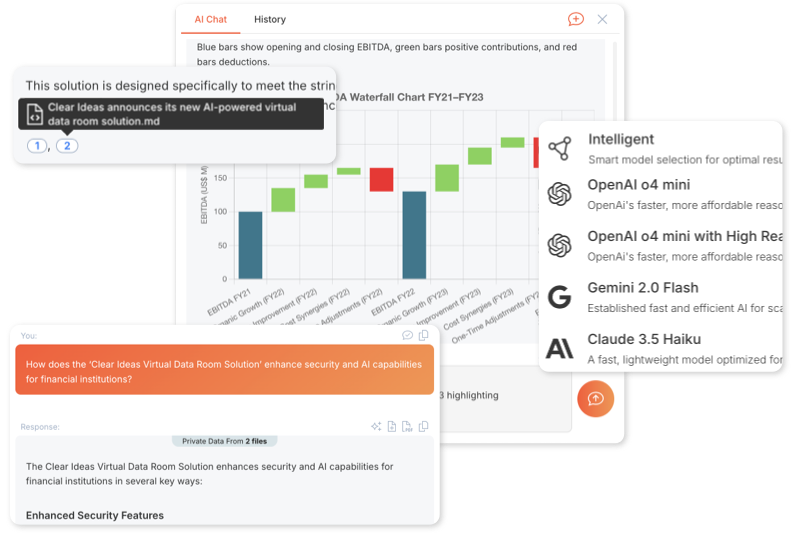
Clear Ideas™ AI Chat is powered by industry‑leading AI models





Document-grounded chat
Cited Answers Tied to Approved Sources
AI Chat is useful only if the answer can be checked. Clear Ideas retrieves from the approved Site content the user is allowed to see, carries citations into the response, and keeps model activity visible for later review.
Users can choose approved models, generate files when a model supports it, and ask across selected Sites or files. Administrators can review model usage, source context, permissions, exports, and audit history after the answer is written.
- Multi-Model AccessClear Ideas™ connects chats to leading models from OpenAI, Anthropic, Google, xAI, and Cohere inside the same governed workspace as approved documents, citations, permissions, and audit records.
- Private AI Model AccessPaid accounts can use Clear Ideas-managed private model routes for sensitive analysis. Private model chats stay in the same governed chat experience and use a small access charge plus token-based AI credit usage.
- AI Chat Grounded in Your DocumentsAsk questions and receive answers that cite approved documents, including PDFs, spreadsheets, image files, and code. Scanned documents are included thanks to built-in text extraction.
- Spreadsheet, Document, and Presentation GenerationUse skill-capable models to create native Excel, Word, and PowerPoint files directly from chat. Clear Ideas can inspect approved source files, run sandboxed Python where needed, return downloadable file cards, and save generated files back to Sites.
- Site-Scoped Security and File PermissionsEvery chat is tied to a specific Site or collection of Sites, enforcing role-based access and encrypted data boundaries. Users can attach or detach individual files so each query sees only what it needs.
- Usage Analytics and Audit TrailsDetailed logs show who viewed which files, which queries ran, and how AI was used across both in-app chat and Model Context Protocol exchanges. These records support compliance reviews, governance, and post-sharing visibility.
Site Scoping
Choose Exactly What AI Chat Can See
Site Scoping is Clear Ideas context control for AI Chat. Users choose the governed Sites, and optionally the individual files, that are allowed to supply context for the conversation.
That matters because a good AI answer depends on the right boundary. A team can start with a Site, narrow to a few source files, add another Site for comparison, or change scope when the conversation moves to a new question.
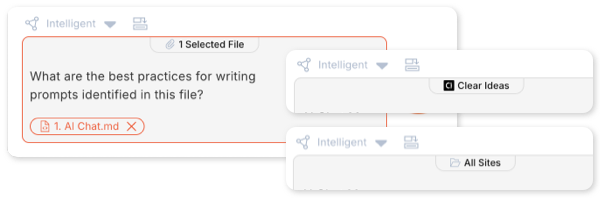
- Clear Context ControlUsers can see and choose the content boundary before they ask, instead of hoping the model finds the right sources across a broad tenant.
- Better Answers With Less NoiseScope can start broad, then narrow to a Site or a few files when the question needs a precise answer, comparison, or generated file.
- Change Scope as the Chat EvolvesWhen the conversation moves from one topic to another, users can adjust the Site or file context without losing the thread.
Conversation tools
Ask, Attach, Fork, Generate, and Save
A useful answer is rarely the final step. Teams need the right context, a way to try alternatives, a path from answer to file, and a reliable place to keep the outputs they trust.
AI Chat keeps those controls close to the conversation so users can move quickly while governance, policy, and source visibility stay intact.
- Chat History and ForksKeep conversations searchable, archive inactive chats, and fork from any response when a team wants to compare models, prompts, or analysis paths without overwriting the original thread.
- File and Image ContextAttach individual files, including approved image files when visual context matters. Clear Ideas keeps the model inside content the user is allowed to access.
- Skills for Generated FilesUse skill-capable models for spreadsheets, Word documents, PowerPoint files, charts, slides, and sandboxed Python analysis. Generated files can be downloaded or saved back to a Site.
- Image Generation in ChatCreate visuals with supported image-capable models, review the results inline, and copy or download generated images from the conversation.
- Web Search When It HelpsTurn on web search for current public context when policy allows, then combine that context with cited Site content when the answer needs both current information and internal records.
- Templates, Voice, and Suggested PromptsStart from reusable templates, dictate prompts by voice, and use Site-aware suggestions for summaries, risks, comparisons, decisions, checklists, and stakeholder updates.
Evaluate
Evaluate AI Chat With the Right Next Step
Start with a self-serve trial, compare capabilities in detail, or route a technical review with sales when you need security, model policy, private model, or deployment alignment.
Related reading
Governed AI Chat, Citations, and Document-Grounded Analysis
Further reading on governed AI chat, citations, and document-grounded analysis.
- Governed AI Checklist for Private Document AnalysisA practical checklist for citations, permissions, provenance, and auditability.
- Using AI Chat for Financial AnalysisA concrete example of grounded AI chat in finance-sensitive document workflows.
- AI Chat Best Practices for Legal TeamsGuidance for using cited AI chat in permission-sensitive professional work.
Frequently Asked Questions
Which AI models are available in Clear Ideas AI Chat?
Clear Ideas integrates leading AI models from providers such as OpenAI, Anthropic, Google, Cohere, and xAI. Paid accounts can also use Clear Ideas-managed private model routes when enabled for the workspace. The Intelligent model selector automatically chooses an appropriate model based on your task complexity, content type, and cost requirements. You can also manually select from the models available in your environment for different use cases.
How are AI credits calculated for chat conversations?
AI credits are consumed based on the amount of data processed (input tokens from your prompts and retrieved content) plus generated output (response tokens). Different models have different credit rates—advanced reasoning models consume more credits than standard chat models. Private model routes add a small access charge for each user-visible response, then use normal token-based AI credit rates. Your subscription includes a monthly AI credit allocation, and additional credits can be purchased.
How do private AI models work?
Private AI model access uses Clear Ideas-managed model routes for sensitive analysis while keeping the normal governed chat experience, citations, permissions, and audit records. Chats are still private to the people who have access to the conversation unless you choose to share them. Private models are available on paid accounts and use a small access charge plus token-based AI credit usage.
Is my data used to train AI models?
No. Customer data processed through Clear Ideas is not used to train AI models. All data transmission is encrypted, only the minimum necessary context is shared with models to generate responses, and Clear Ideas does not send your full dataset with each request.
Can AI Chat access all my documents?
AI Chat respects all permission controls and Site Scoping. When you start a chat conversation, you select which Sites the AI can access. The AI retrieves only from documents within those selected Sites that you have permission to view. You can change the selected Site or file scope as the conversation progresses, so the model sees the right context for the current question.
How accurate are AI Chat responses?
AI Chat responses are grounded in your actual documents with source citations for every claim. The retrieval system finds relevant content from your documents and provides it as context to the AI model, which generates responses from that approved material. Citations link back to specific documents so you can verify accuracy and review the source directly.
Can I customize AI Chat behavior?
Yes, use Output Templates to guide AI responses toward specific formats, tones, or content structures. Templates are markdown documents stored in your sites that define how the AI should structure responses. For example, create templates for executive summaries, technical documentation, compliance reports, or client-facing communications. Each chat can reference different templates for consistent output formatting.
Can AI Chat generate images, spreadsheets, documents, presentations, or use web search?
Yes. Clear Ideas AI Chat supports image generation with supported image-capable models and file generation with supported skill-capable models. You can create visuals, spreadsheets, documents, and presentations directly in the conversation. It can also use web search for questions that depend on current public information, while still supporting document-grounded answers and citations when your approved content is the main source.
Can I export chat conversations?
Yes. Save responses to your Sites, copy text, download generated files, or export conversations as PDFs with source citations intact. Teams can keep important AI-assisted analysis alongside the source material that informed it.
What is the Model Context Protocol integration?
Model Context Protocol (MCP) allows compatible AI applications (like Claude Desktop, Cursor IDE) to securely query your Clear Ideas content during their workflows. When enabled, these applications can retrieve relevant context from your approved documents to enhance their responses—all while maintaining Clear Ideas security controls. Only authorized applications with valid access keys can connect, and all interactions are logged in audit trails.
Can I fork conversations to explore alternatives?
Yes, fork any message in a conversation to create a new branch exploring alternative approaches or questions. Use forks to compare different AI models on the same question, test prompt phrasing, or explore multiple analytical directions without losing the original conversation thread. Each fork maintains its own independent history while preserving the shared conversation context up to the fork point.