Teach an Agent how you prepare a report.
Create an Agent to prepare a recurring report, compare agreements, or extract figures. Give it new documents, review the draft, and keep the files and step history together.
How an Agent runs
Define the process once.
Keep the record of every run.
For a monthly report, an Agent might read the new statements, compare the figures, and draft a summary. Review each step and keep the draft files with the documents it used.
- 01
Define
Steps, variables, output format
Saved Agent definition - 02
Scope
Approved sources, models, tools
Permissions for this run - 03
Run & review
Execute steps; pause for approval
Step outputs and decisions - 04
Deliver
Files, source references, run evidence
A result you can inspect
Agent design
Start with an instruction.
Or a document worth repeating.
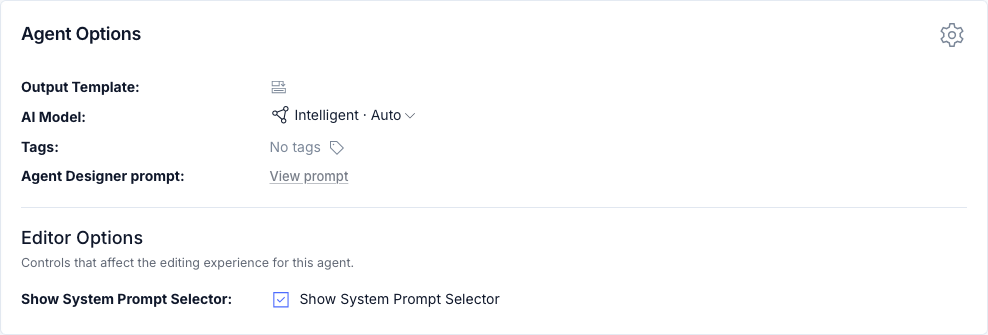
Describe the result with Agent Designer, reverse-engineer a strong example with Build From Document, or edit the process visually. Set the variables, approved sources, model choices, and tools before you run it.
Explore Agent Designer →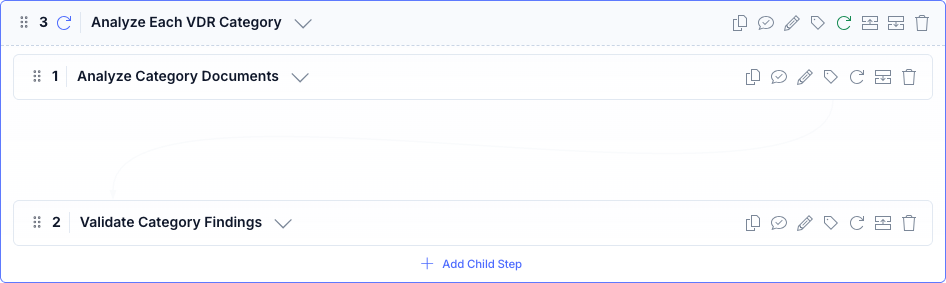

Run and review
Inspect the output of each Agent step.
Inspect each stage of an Agent run instead of treating the result as a single answer. Keep source context, tool activity, and generated files available for review.
- Defined inputs and instructions
- Human checkpoints where needed
- Step outputs for inspection
Run evidence
Retain generated files and run records.
Return to the documents, tool activity, and draft files behind a report. Each run has its own history, so a colleague can see how it was prepared.
- Sources and execution context
- Generated deliverables attached to the run
- Governed evidence export where supported
Build, connect, and operate Agents.
Choose how a process is created, when it runs, what it can access, and what it produces.
Start when a new file arrives
Start manually, on a schedule, when files upload, from a webhook, or from another Agent.
Connect approved sources
Use Sites and approved MCP connections with explicit read/write modes and tool allowlists.
Build the steps you need
Combine prompts, loops, code, webhooks, sub-agents, variables, and structured outputs.
Generate usable files
Produce Excel workbooks, Word documents, and PowerPoint presentations with supported models; keep the files with the run.
Extract structured metadata
Run an Agent when a document is uploaded to a Site or folder. Extract details such as an expiry date into fields you can search later.
Review and improve
Add Human Approval, inspect validation warnings and benchmark checks, and review sources, tool activity, and generated outputs.
Availability varies by plan and configuration. Compare plans →
Explore Agents
in detail.
Turn a strong finished document into reusable steps, variables, and output structure.
Start from a description or exemplar and refine the generated process.
Define external connections and the tool access an Agent needs.
See examples of recurring reports, comparisons, and document reviews.
Explore standalone open-source execution and its responsibilities.
Define inputs, outputs, and review before you automate.
Decide what AI can access and when it needs approval.
Choose the files AI can use, limit an Agent’s tools, and add a step for a person to review.
Review the source and approval controls →Questions about Clear Ideas
How do I create an Agent?
Describe the report or review you need with Agent Designer, start from a finished example with Build From Document, or edit a process visually. Compatible MCP tools can also author and validate Agent definitions.
Can an Agent run automatically?
Yes. Runs can start on a schedule, from a file upload or webhook, or from another Agent. Define the approved inputs and add Human Approval where the process needs a reviewer.
What can an Agent produce?
Supported models can generate Excel workbooks, Word documents, PowerPoint presentations, images, and structured outputs. Generated files remain attached to the run that produced them.
What controls the tools and sources it can use?
The run has an explicit source, model, and tool scope. Approved connections define permitted access; code steps run in a sandbox. Review the sources, tool events, outputs, and available evidence export for the completed run.
Prepare the next report with an Agent.
Save the steps for your report or review and run them with new documents. Keep the drafts and run history together.
No credit card required. What’s included in Free