Artificial Intelligence
Clear Ideas™ AI Enhanced Search
Search approved Site content with hybrid vector and full-text retrieval, metadata @ filters, OCR, permission-aware results, redacted PDF representations, and analytics for search demand.
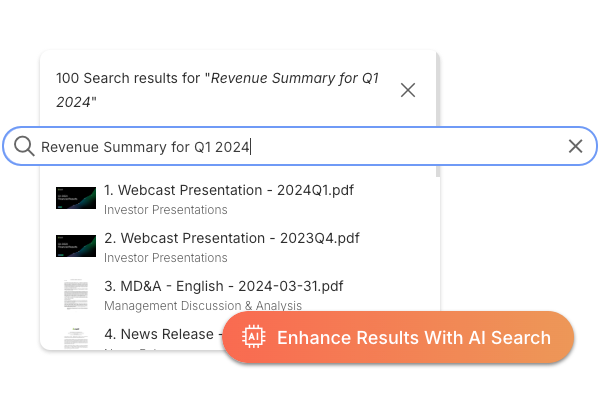
Permission-aware search
Find the Right Document Without Leaving the Site Boundary
Search has to work the way reviewers ask questions. A user might remember a concept, an expiry year, a counterparty name, or a phrase from a scanned PDF. Clear Ideas combines semantic retrieval, metadata filters, OCR, and filename matching so the search can follow the intent instead of forcing people to guess exact keywords.
The results still stay governed. Site permissions, role-specific document access, and redacted PDF representations shape what can be returned, so discovery does not become a shortcut around the document controls.
- Semantic SearchUse semantic search to interpret context, intent, and meaning. Find relevant information even when documents use different terminology.
- Metadata Filter Search with @ SyntaxApply precise metadata filters inline using @ tokens such as @expiryDate:2026. Combine open-text search with structured metadata constraints in a single query to narrow large result sets quickly.
- Advanced OCR IntegrationAutomatically extracts and indexes text from scanned documents, images, and PDFs. Makes previously unsearchable content fully discoverable and accessible.
- Redaction-Aware RetrievalWhen PDF redaction is configured, retrieval stays permission-aware by returning the redacted representation for restricted roles across search, extracted text, and AI-grounded answers.
- Search Analytics and InsightsTrack search queries, popular content, and user search behavior to understand information needs and optimize your content organization.
- Permission-Aware ResultsSearch results automatically respect user permissions and site access controls. Users only see content they are authorized to view.
Evaluate
Validate Search Quality Quickly
Run your own search scenarios in trial, including metadata filters, scanned documents, redacted PDFs, and cross-Site searches. Escalate to sales when you need retrieval, security, or deployment alignment.
Related reading
Retrieval Quality, Metadata Search, and Governed Access
Supporting articles on retrieval quality, metadata-driven search, and governed document access.
- Metadata-Powered Document SearchA practical guide to combining document text with extracted metadata filters.
- Search and AI Analytics: Understanding Stakeholder IntentUse search and AI behavior to spot information gaps and reviewer goals.
- Governed AI Checklist for Private Document AnalysisOperational guidance for permission-aware retrieval over approved materials.
Frequently Asked Questions
How does AI Enhanced Search differ from traditional keyword search?
AI Enhanced Search uses semantic understanding to interpret query intent and meaning. It understands synonyms, context, and conceptual relationships—searching for "board meeting minutes" also finds "governance session notes" and "director discussions." This reduces the need to guess exact terminology while finding more relevant results than keyword-only search.
Can AI search understand natural language questions?
Yes, ask questions in plain English like "What were the key risks identified in Q3?" The AI interprets your question intent, retrieves relevant context from documents, and ranks results by relevance to your actual information need.
Does search work with scanned documents and images?
Yes. Built-in text extraction processes scanned PDFs, images, and documents so detected text can be searched alongside native digital content. OCR quality depends on the source image, so handwriting or low-quality scans may require review, but extracted text and configured metadata become part of the search experience.
Can I filter by extracted metadata in search?
Yes, search supports @ metadata filters like @expiryDate:2026 and mixed queries that combine open-text terms with metadata constraints. This is useful for scenarios like finding all IDs expiring this year while still searching by names, entities, or other document text.
How does permission-aware search work?
Search results automatically respect all permission controls and site access boundaries. Users only see content from sites they have access to and documents within their permission level. External users do not see results from unauthorized sites.
Does AI search respect PDF redaction?
Yes. When a PDF has a finalized redacted representation, restricted users retrieve from the redacted representation rather than the original. That keeps AI search, extracted text access, summaries, and AI Chat aligned with the version of the document the user is allowed to see.
Can I search across multiple sites at once?
Yes, search across all sites you have access to simultaneously or scope search to specific sites for focused results. This enables cross-site discovery (finding similar contracts across subsidiaries) while respecting site-level security boundaries. Site-scoped search ensures sensitive information stays within appropriate contexts.
What file types are searchable?
All major file types including PDFs, Microsoft Office documents (Word, Excel, PowerPoint), text files, markdown, HTML, images with text, scanned documents, presentations, and more. Audio and video files are searchable via transcripts if available.
How current are search results?
Search indexes update in near real-time as content is added, modified, or deleted. New documents typically appear in search results within minutes of upload, so users search against current content without manual reindexing.
Are search queries logged for analytics?
Yes, search analytics track query patterns, popular topics, result click-through rates, and search success metrics. Site administrators see what users search for, which results they select, and where searches fail.
How does search integrate with AI Chat?
AI Chat uses the same semantic search technology to retrieve relevant context for answering questions. When you ask AI Chat a question, it searches your approved documents using advanced retrieval to find pertinent information, then generates responses grounded in those search results with source citations.