Source Document
Start from a polished report, checklist, template, or repeatable deliverable.Agents
Agent Builder: Build From Document
Build From Document turns a single high-quality document into a multi-step agent draft. Upload a finished report, marketing asset, or technical spec, and Clear Ideas reverse-engineers a repeatable agent you can refine and run across different data sources.
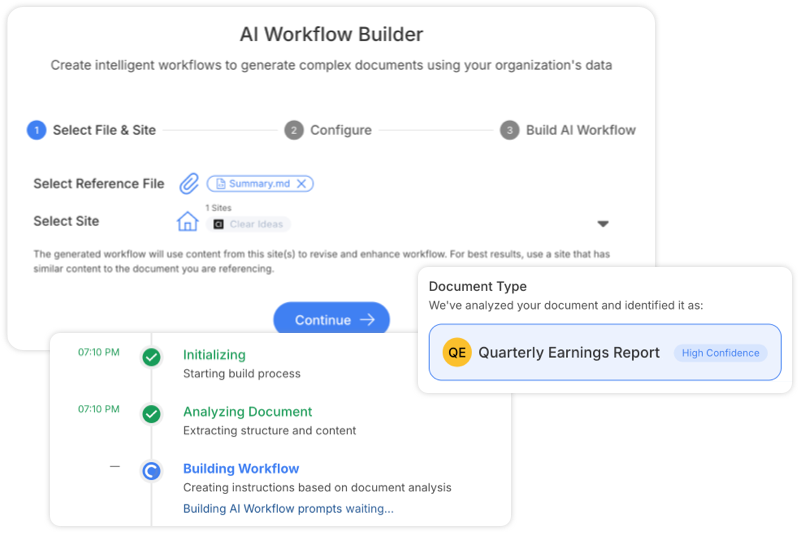
Document-first agent creation
Turn a Strong Example Into a Repeatable Agent
Build From Document starts from a document your team already trusts: a finished report, proposal, brief, checklist, or template. Clear Ideas studies the structure, voice, recurring variables, and output shape, then turns that example into an agent draft.
The result is a practical bridge from one good document to a reusable process. Teams can inspect the generated steps, refine prompts, review detected variables, benchmark output quality, and run the finished agent against approved Sites.
This is useful when the process is easier to show than describe. The source document gives the agent a concrete example of the structure, voice, and level of detail the output should match.
Build from document path
Turn a Strong Document Into a Reviewable Agent
Build From Document should show a transformation, not a tall page capture: source material is analyzed, mapped into steps, reviewed, then run as a governed agent.
Analyze Structure
Detect sections, intent, inputs, outputs, and reusable process logic.Draft Agent
Generate steps, variables, source scope, model choices, and output shape.Review Signals
Inspect warnings, variable mapping, benchmark cues, and generated content.Run Repeatably
Apply the agent to approved Sites with evidence and generated outputs.Reviewable buildSource structure, generated steps, variables, and review signals stay visible
What the builder extracts
Structure, Variables, Style, and Quality Signals
Build From Document decomposes the source document into the parts an agent needs to recreate comparable deliverables with governance and review.
- Detect Document Type and StructureUpload a finished document and let Build From Document identify the type, sections, recurring patterns, and output structure that should become an agent draft.
- Discover Reusable VariablesIdentify inputs that change between runs, such as company names, reporting periods, dates, people, financial figures, products, and thresholds.
- Create Agent StepsTurn the source document into ordered prompts, variables, output expectations, and reviewable steps that can run against approved Sites.
- Capture Tone and Output ShapeUse the source document as a quality reference for voice, structure, headings, tables, citation style, and the level of detail expected in the output.
- Multi-Stage Build ProcessStructured build process for analyzing the source document, generating an agent draft, estimating cost, and preparing the result for review.
- Quality BenchmarkingBenchmark generated outputs against readability, structure, and formatting expectations so teams can review quality before broader rollout.
- Review and Refine PromptsOpen the generated draft in the visual editor, adjust prompts, add source connections, set required variables, and tune the agent before it is used broadly.
- Real-Time Build ProgressLive progress tracking with detailed status updates for each stage of the agent build. See exactly what Build From Document is analyzing and preparing in real time.
- Handle Different Document ComplexityUse the same build path for simple forms, recurring briefs, technical specs, multi-section reports, diligence materials, and other structured deliverables.
- Run Against Approved SitesAfter review, run the generated agent against approved Clear Ideas Sites with scoped source access, model choices, generated files, and evidence.
- Reuse Across SitesReuse the same agent pattern across different Sites and data sources while keeping local source scope and variables explicit for each run.
- Cost and Token EstimationEstimate token usage and processing costs before building an agent draft, so teams can tune the process before broader use.
- Build NotificationsGet notified when the build completes or needs attention, so longer document analysis does not require constant monitoring.
- Document Structure PreservationMaintains the logical flow and structure of your original documents while making them dynamic and reusable. Preserves formatting, section relationships, and content hierarchy.
Related reading
Build Stronger Document-Based Agents
Articles that help teams turn strong example documents into repeatable agent systems.
- Turn Your Best Documents into Automated AI WorkflowsA practical bridge from finished documents to repeatable agent execution.
- Technical Guide: Controlled AI Workflow DesignImplementation guidance for agent structure, inputs, and control.
- AI Workflow Checklist: From Documents to Repeatable ProcessA launch checklist for taking a generated agent into dependable daily use.
Frequently Asked Questions
How does Build From Document reverse engineer documents into automated processes?
Build From Document analyzes a strong finished document, extracts its structure, variables, and output patterns, then turns that logic into a working multi-step agent draft. The result is reusable agent logic you can review, refine, and run against approved content.
What types of variables can Build From Document automatically detect in documents?
The system can identify common changing elements such as company names, people, dates, financial figures, time periods, product names, and recurring structural patterns. It also recognizes headings, tables, citation styles, and other repeated output conventions that help make the agent reusable.
Can you create due diligence agents from existing investment reports?
Yes. You can upload a finished diligence report as an example, and Build From Document can generate an agent draft that extracts relevant metrics, structures the analysis, and produces a comparable deliverable for new investment targets. You can then refine the agent to match your review standards and reporting needs.
How does Build From Document ensure output quality?
Build From Document uses the source document as a quality reference, generates a structured agent draft, and can benchmark outputs against readability, structure, and formatting expectations. Teams can then review and refine prompts, templates, and agent logic before broader rollout.
How quickly can you generate ready-to-use agents from example documents?
In many cases, Build From Document can generate a usable agent draft in minutes. Upload the example document, let the system analyze its structure, then test and refine the resulting agent before deploying it more broadly.
Ready to get started?
Share sensitive information securely with clients, auditors, and partners. Then turn approved content into cited answers, Governed Agents, and measurable engagement.
Start Free
Book a DemoNo credit card required
Need help?
Get personalized assistance
Speak with our sales team to find the perfect plan for your organization.
Technical support & resources
Access support resources, documentation, and help guides.