Free Plan
Limited immediate imports for testing
Sites
Import public websites, extract metadata, and turn updates into governed Site content
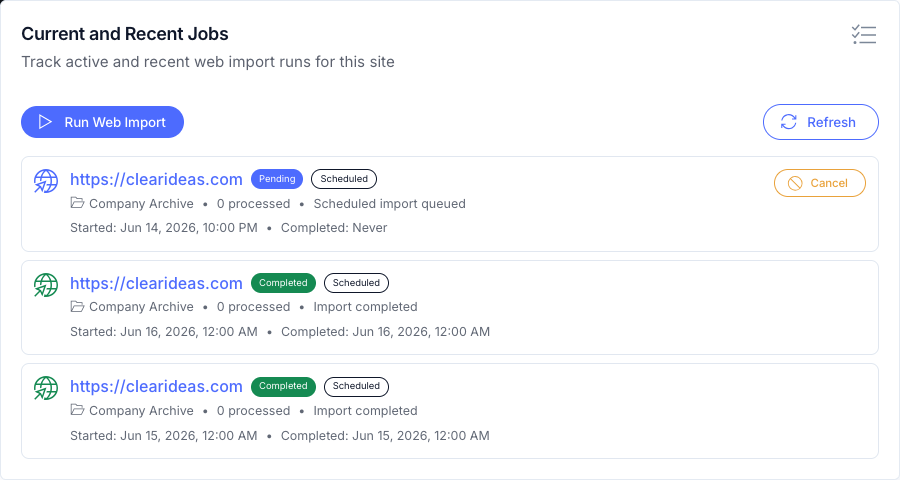
Run immediate or scheduled Web Imports with URL masks, depth controls, HTML and PDF options, job history, metadata extraction rules, completion triggers for agents, and Public AI Chat freshness.
External content monitoring
Teams waste valuable time on repetitive monitoring tasks that can be automated. The harder part is not visiting a public website once; it is checking the right sources on schedule, tracking what changed, and turning the update into action.
Manual checks are also easy to lose. Someone notices a competitor update, a regulatory page changes, or documentation gets refreshed, but there is no durable version history and no consistent handoff into analysis. Clear Ideas Web Import turns public websites into scheduled Site content, with versioning, search, agent analysis, and Public AI Chat synchronization around the imported record. Metadata extraction workflows can then turn selected content into structured Site attributes for search, filtering, and review.
Content automation
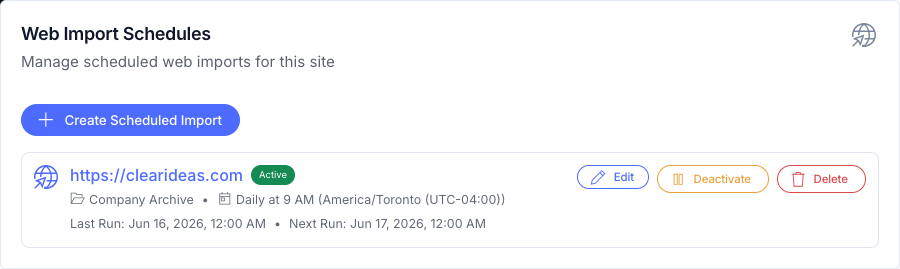
Clear Ideas Web Import captures content from public websites on your schedule. Version management tracks changes, completion triggers can enqueue governed agent runs, and metadata extraction rules can populate structured attributes while Public AI Chat stays current with the latest imported material.
Web import features
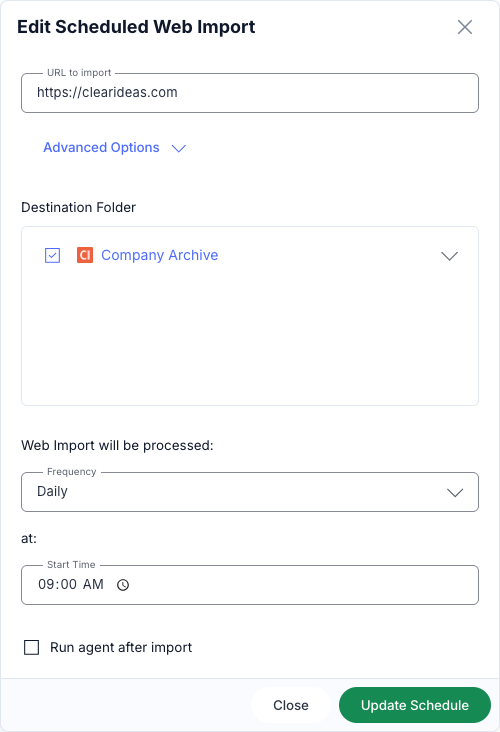
A governed import job defines the source scope, link depth, HTML and PDF handling, destination folder, schedule, version behavior, extraction rules, and downstream AI use so imported content becomes governed Site material.
Automation scenarios
The value shows up when a recurring public source matters to a team: competitor websites, regulatory pages, documentation portals, industry news, or other material that needs to be tracked without relying on someone remembering to check.
Rollout
Use the feature comparison and a product walkthrough to choose the right deployment model.
Governed agents
Web Import creates the data foundation. Governed Agents turn that data into intelligence.
Connected workflows
Imported pages become more useful when they feed Clear Ideas Sites, Public AI Chat, and Governed Agents. Public AI Chat can answer from them, agents can analyze changes, and metadata extraction can keep structured fields searchable beside the imported record.
Related reading
Reference material for scheduled content imports, triggers, and automation operations.
Web Import works with any publicly accessible HTTP or HTTPS website—no authentication required. It captures HTML pages and linked PDF documents. Common use cases include competitor websites, regulatory agency pages, industry news sites, documentation portals, and public knowledge bases. The content must be publicly viewable without login credentials.
Scheduled imports run automatically in the background at your chosen frequency: Hourly (every hour at a specified minute), Daily (once per day at a specified time), Weekly (on specific days of the week at specified times), or Monthly (on specific dates or expressions like "first Monday"). All schedules are timezone-aware and can be activated, deactivated, or modified at any time.
Clear Ideas maintains a one-to-one mapping between source URLs and imported files. When content changes, a new version is automatically created while preserving all previous versions. You can view any historical version, compare versions side-by-side to see exactly what changed, and track how external content changed over time. Versions are only created when actual content changes are detected, avoiding unnecessary duplication.
Yes, you have granular control over import scope. Use URL masking to restrict imports to specific sections (e.g., only pages under "/docs/"), set link depth to control how many levels deep the crawler follows links (1-3 levels), specify destination folders for organized storage, and choose whether to include linked PDF documents. These controls help you capture exactly the content you need without excess.
Agents can be configured to run on schedules that align with your import schedules. For example, set a weekly import for Monday at 8 AM, then schedule an agent run for Monday at 9 AM to process the imported content. The agent can compare versions, extract changes, summarize updates, identify risks, and send notifications without manual intervention.
Yes. Site administrators can configure metadata extraction workflow rules for a whole Site or a specific folder. Each rule references an approved agent, can replace or merge metadata, and tracks last run status so teams can see whether extraction completed successfully.
Absolutely. Every site includes an immediate Web Import option for testing. Navigate to your site, click Web Import, enter the URL, configure your settings (URL masking, depth, destination folder), and run it immediately. Review the results to verify settings work as expected, then create a schedule using those same settings for automated recurring imports.
Content imported via Web Import is indexed for Public AI Chat when the chat is configured to use that Site. Scheduled imports help keep public answers aligned with external documentation after each import and indexing cycle completes.
Imported files are organized in your Clear Ideas site following the source website structure. You specify a destination folder, and Web Import creates subfolders mirroring the URL path structure. Each URL maps to one file location, with versions tracked automatically. Files are searchable through semantic and AI-enhanced search, and subject to the same role-based permissions as all other content in your site.
Yes, you can create multiple import schedules within a single Clear Ideas site, each targeting different source websites. Specify different destination folders for each source to keep content organized. This is ideal for competitive intelligence (monitoring multiple competitors), regulatory tracking (multiple government agencies), or news aggregation (multiple industry publications).
Storage consumption depends on the volume of content imported and change frequency. As versions are only created when content actually changes, storage is used efficiently.