Activity Capture
Views, downloads, uploads, access events, searches, and AI requests.Sites
Clear Ideas™ Analytics & Insights
See what was reviewed, what was missed, and what needs follow-up
Clear Ideas analytics is built for governed Sites: content activity, PDF page-level signals, search and AI intent, access review, audit trails, signed evidence, and organization AI usage stay connected to the workspace that produced them.
Signals to action
Analytics Should Change What the Team Does Next
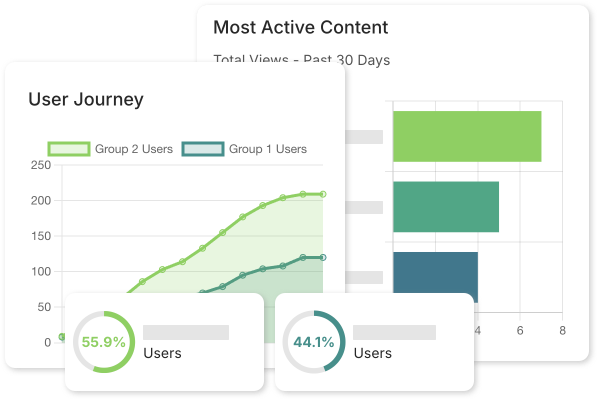
A controlled review space should not leave the team guessing what deserves attention next. Clear Ideas turns review activity into operating signals: what people opened, which PDF pages drew attention, what they searched for, which AI questions they asked, and whether access still matches the engagement.
That makes analytics useful beyond reporting. Teams can update Sites, follow up with specific stakeholders, tighten permissions, improve AI-enabled content, manage AI usage, and preserve evidence for later review.
Analytics reports in context
Analytics That Point to the Next Action
Analytics connect user activity, PDF page views, search demand, AI usage, access review, and governance evidence so teams can see what matters and respond quickly.
PDF Page Views
Per-document page histograms, unique viewers, top pages, and page links.Search Demand
Popular terms, average results, zero-result demand, and discovery mix.AI Usage
Chat topics, source paths, requests, users, models, tokens, and credits.Governance Record
Access review, audit trail, signed evidence export, and local verification.Workspace signalsContent, search, AI, access, and evidence activity stay tied to the Site
Analytics dashboard
The Analytics Dashboard, With the Report Menu Open
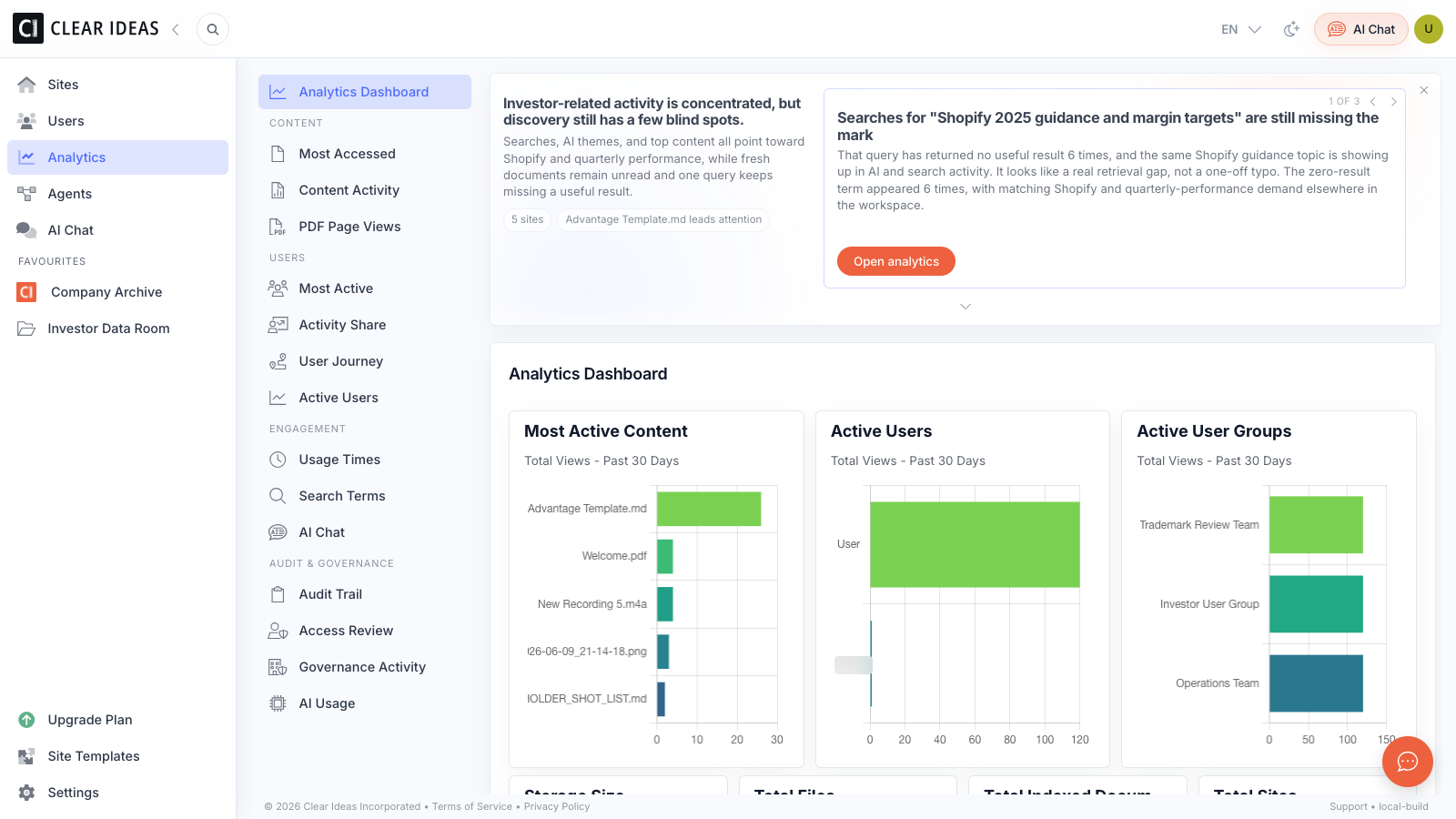
The full dashboard keeps the app navigation, analytics report menu, insights, and charts visible together, so teams can move from a signal to the report that explains it.
Analytics scope
Review Signals Across Content, Search, AI, and Governance
Clear Ideas analytics shows whether users are active, which files matter, which PDF pages were viewed, which search terms are producing answers, which terms are producing nothing, which AI topics are recurring, and how AI is being used against approved content.
The same area also supports administrators who need evidence: access review, audit trails, governance activity, CSV exports, organization AI usage, signed evidence exports, and local evidence verification where a stronger record is required.
- Content ActivityTrack which files are viewed, downloaded, uploaded, or accessed across Sites, with report filters for Site, user group, date range, action, and frequency.
- PDF Page ViewsSee total page views, unique viewers, tracked PDFs, top pages, and per-document page histograms with click-through to the exact page.
- User and Group ActivityCompare most active users, user groups, activity share by Site, monthly active users, unique action counts, and usage timing.
- Search DemandUnderstand popular search terms, average results, zero-result searches, and discovery paths so content gaps become visible before they become follow-up churn.
- AI Chat and AI UsageAnalyze AI chat themes, entities, keywords, sentiment, intent, and complexity, with internal/public chat source filters and organization AI usage by chat, agents, users, models, tokens, credits, and requests.
- Access ReviewReview access grants by Site, user, role, invite state, access type, expiry, last activity, downloader capability, admin access, inactivity, and long-running access.
- Audit and Governance EvidenceReview audit trail records, governance activity, action presets, activity details, grouped evidence history, signed evidence exports, and the local evidence verifier.
Report families
Focused Reports for Review, Search, AI, and Governance
Analytics in Clear Ideas is organized around practical reports. The dashboard and Insights Report help teams orient quickly; deeper reports let owners answer a specific operational question without exporting raw activity first.
- Dashboard and Insights ReportStart with the operating view: active content, active users, active groups, storage, indexed documents, live insights, AI summary, recommendations, discovery mix, usage timing, top searches, top AI topics, and zero-result demand.
- Most Accessed and Content ActivitySeparate “popular” from “important” by seeing what is opened often and which content actions occurred over the selected period.
- PDF Page ViewsUse per-document page histograms, unique-viewer counts, top pages, and click-to-open page links to see which parts of PDFs received attention.
- User Activity and JourneyCompare most active reviewers, activity share, monthly active users, usage timing, and unique action counts by user or user group.
- Search Terms and AI ChatConnect search behavior and AI questions to the underlying content, including average search results, zero-result demand, internal/public chat source, and AI topic classifications.
- Access ReviewReview users by Site, role, invite state, access type, expiry, last activity, activity counts, admin access, downloader capability, inactivity, and long-running access.
- Governance Activity and Organization AI UsageGive organization administrators a broader view of governed events, evidence exports, local verification, AI credits, tokens, requests, users, models, chat, agents, and other AI activity.
Review questions
Answer the Questions That Usually Require Manual Follow-Up
The strongest analytics reports reduce meetings, email follow-up, and manual access reviews by making the important review questions visible inside Clear Ideas.
- Are stakeholders reviewing the right materials?Most accessed content, content activity, and PDF page-view histograms show whether the right files and pages are drawing attention.
- Where is the Site failing to answer questions?Search terms, average results, zero-result searches, AI chat themes, and discovery mix reveal which topics are unclear, missing, or hard to find.
- Which reviewers need follow-up?Most active users, activity share, monthly active users, usage times, and user journey reports make reviewer engagement easier to compare.
- Who still has access, and does that access still make sense?Access Review brings roles, invite state, external access, expiry, inactivity, downloader capability, and admin access into one reviewable report.
- Can the team explain what happened later?Audit Trail, Governance Activity, activity details, signed evidence exports, and local verification preserve the operational record behind review, AI, and governance activity.
- Where is AI usage going?Organization AI Usage shows credits, tokens, request volume, users, models, AI Chat, agents, and other AI activity for administrators who manage cost and policy.
Fit review
Review Analytics Fit
See how Clear Ideas analytics would support your Sites, stakeholders, AI usage, access review, and evidence workflows.
Compare analytics, access review, and evidence requirements with the Clear Ideas team.
Related reading
Engagement Data, Review Signals, and Follow-Up Action
Articles that help teams translate engagement data into clearer review signals and follow-up action.
- Mastering Engagement Analytics in the Virtual Data RoomA foundational guide to reading engagement patterns in high-stakes review workflows.
- Understanding Page-Level Analytics in VDRsSee which pages drew attention and where stakeholders slowed down.
- Search and AI Analytics: Understanding Stakeholder IntentConnect search and AI activity to information gaps and reviewer intent.
- Tracking User Journeys in Your Data RoomMap how reviewers move between documents once this article is live.
Frequently Asked Questions
What analytics does Clear Ideas collect?
Clear Ideas collects activity from Sites, content actions, PDF viewer events, search, AI Chat, access, and governance events, then presents it through dashboards and focused reports. Teams can filter by Site, user group, date range, action, frequency, AI chat source, and report-specific fields depending on the surface.
What types of user journeys can I track?
Track content discovery, document viewing, search, AI interaction, downloads, and related activity through reports such as Most Active, Activity Share, Monthly Active Users, Usage Times, and User Journey. These reports help teams compare reviewer and group engagement, while PDF Page Views adds page-level attention signals for document-heavy materials.
Can analytics show PDF page-level engagement?
Yes. Clear Ideas analytics include PDF page-level reporting with total page views, unique viewers, tracked PDFs, top pages, per-document histograms, and click-through to the exact page. It shows view activity and attention signals so teams can decide what follow-up is warranted.
How do audit trails support compliance?
Audit and governance reports preserve detailed activity records for user actions, content access, PDF viewer events, search, AI usage, permission changes, Q&A, signing, and governed evidence events. Activity details include structured context such as actor, target, parent object, timestamp, and supporting detail sections where available.
What governance reports are available?
Clear Ideas includes built-in reports for the Analytics Dashboard, Insights Report, Most Accessed Content, Content Activity, PDF Page Views, Most Active Users, Activity Share, User Journey, Active Users, Usage Times, Search Terms, AI Chat, Audit Trail, Access Review, Governance Activity, and Organization AI Usage. Organization-admin reports expose governed events, signed evidence exports, local evidence verification, AI credits, tokens, requests, users, and models.
How does Clear Ideas protect analytics data?
Analytics data inherits the same security controls as your content. Data is encrypted at rest and in transit, and role-based access control limits analytics visibility to authorized users and administrators. Audit and governance reports preserve the underlying activity record, access-review exports are logged, and signed evidence exports can be verified locally for supported governed records.
Can analytics data be exported?
Yes. Reports such as Most Accessed, PDF Page Views, Search Terms, AI Chat, Most Active, Access Review, Audit Trail, and Governance Activity support CSV exports for review and downstream analysis. Governance evidence exports are handled separately as signed evidence packages where a stronger record is required.
Ready to get started?
Share sensitive information securely with clients, auditors, and partners. Then turn approved content into cited answers, Governed Agents, and measurable engagement.
Start Free
Book a DemoNo credit card required
Need help?
Get personalized assistance
Speak with our sales team to find the perfect plan for your organization.
Technical support & resources
Access support resources, documentation, and help guides.