Artificial Intelligence

Public AI Chat for Websites

A controlled AI widget powered by approved Site content

Add Public AI Chat to your website with widget access keys, allowed origins, grounded retrieval, moderation, lead capture, voice, quick links, and scheduled content updates.

Website engagement

Engaging Website Visitors Is Hard

Most organizations struggle to convert website traffic into meaningful conversations and qualified leads. Visitors arrive with specific questions, but the right answer is often buried in documentation, product pages, or support material.

The usual choices are not very satisfying: staff live chat around the clock, leave people to search on their own, or answer the same questions manually through email and support forms. Public AI Chat gives visitors a guided way to ask questions, get grounded answers, and share contact information when the conversation becomes sales or support qualified.

Public AI Chat

Public Chat Grounded in Approved Product Content

Clear Ideas Public AI Chat connects your website to your knowledge base. Visitors get accurate answers from approved material while your team controls the widget origins, enabled tools, moderation rules, and lead capture path.
  • Powered by Your Approved DocumentsPublic AI Chat draws answers from selected Clear Ideas Sites, documentation, product specs, FAQs, and imported website content. Retrieval stays scoped to the Site behind the widget.
  • Lead Capture RulesConfigure when visitors should share contact information or schedule a meeting. Automated notifications go to your sales team with conversation context.
  • Voice ChatVisitors can speak questions, receive transcribed text, and hear responses through streamed text-to-speech audio when voice is enabled.
  • CustomizableMatch your brand with custom colors, positioning, and styling. Control tone, response length, and allowed topics to align with your brand voice.
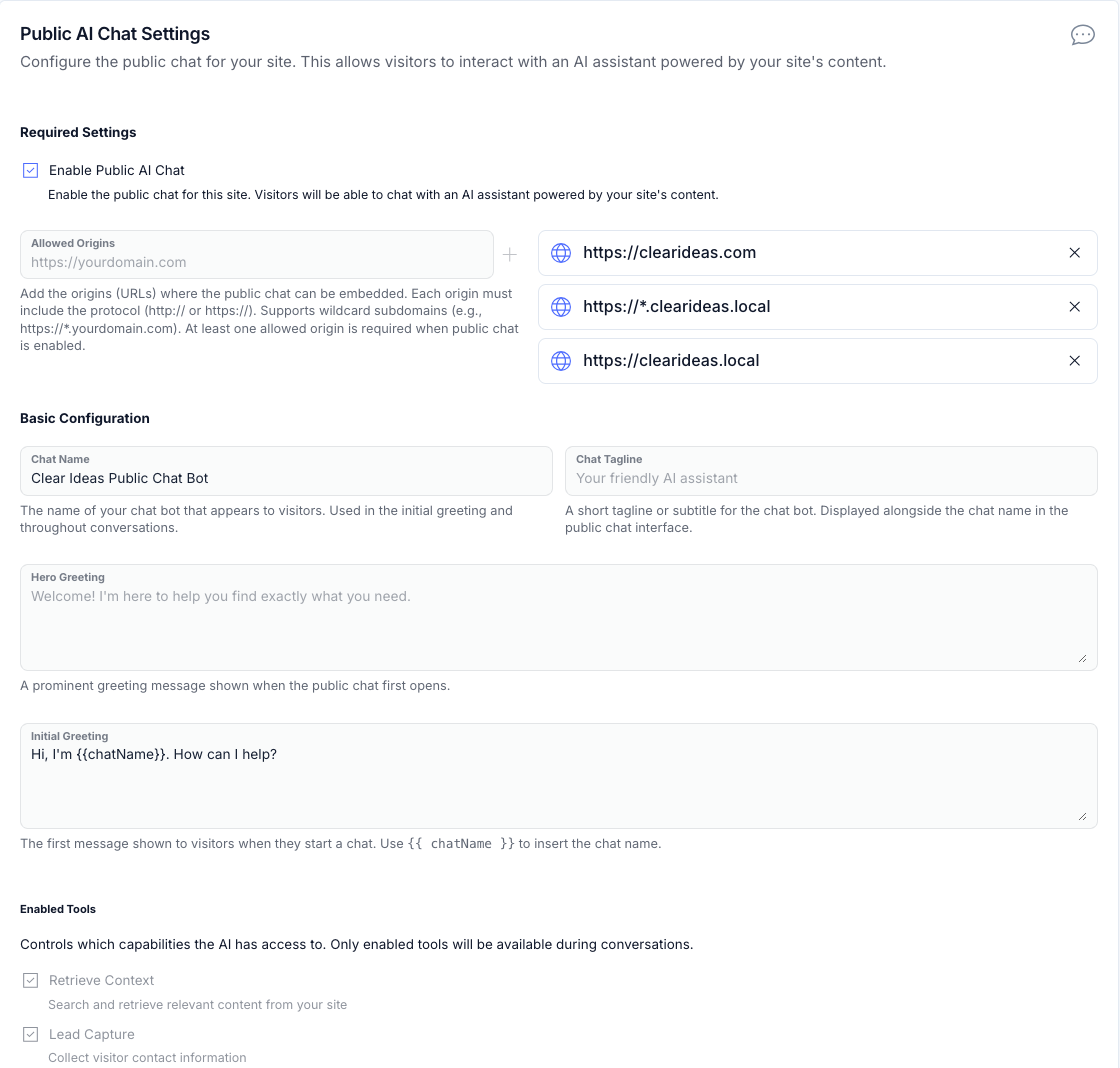
Clear Ideas Public Chat settings showing allowed origins, greeting, and enabled visitor tools
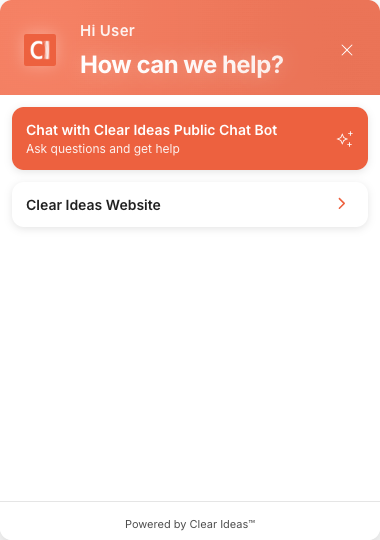
Clear Ideas Public Chat visitor widget with chat and website actions

Website engagement

The Controls Behind a Useful Public Chat Widget

The widget is backed by a Clear Ideas Site, an access key, allowed origins, brand settings, visitor tools, and lead capture rules that administrators can inspect and adjust.

  • Setup and ConfigurationGet Public AI Chat running with an embed snippet, widget access key scopes, allowed-origin security controls, and revocable key management.
  • AI Behavior ControlCustomize brand voice, audience targeting, answer length, terminology, disallowed topics, disclaimers, initial greetings, and moderation behavior.
  • Lead GenerationCapture qualified leads at the right moment with engagement-aware timing, meeting scheduling, notification recipients, and full conversation context.
  • Visitor ExperienceGive visitors suggested questions, greeting text, hello bubbles, disclaimer dialogs, persistent anonymous sessions, voice input and output, and quick links that help them find the right path quickly.
  • Full CustomizationMatch the widget to your brand with accent color, light or dark theme behavior, quick links, welcome messages, and suggested questions.
  • Security That Grows With YouUse allowed origins, widget access key authentication, encrypted connections, Site data boundaries, explicit retrieval and lead-capture tools, and audit trails for a public-facing AI experience.

Applications

Where Public Chat Fits

Public Chat is strongest when the website already has useful source material but visitors need help navigating it. The same pattern works for product documentation, service pages, course catalogs, and controlled professional information.

  • SaaS Product SupportAnswer technical questions from documentation, provide 24/7 support, reduce ticket volume, and capture upgrade leads as documentation changes.
  • Professional Services Lead GenerationAnswer methodology questions, capture meeting requests with conversation context, and route qualified leads to the right team.
  • E-Learning and EducationAnswer prospective student questions about course information, prerequisites, and enrollment details with instant responses and lead capture.
  • Healthcare and Professional ServicesAnswer general questions while redirecting sensitive topics, using disallowed topics and custom guidance to maintain compliance boundaries.

Content automation

Powered by Clear Ideas Content Automation

Public AI Chat can stay current without a manual rewrite cycle. Scheduled imports bring public documentation or website pages into a Clear Ideas Site, and the widget answers from the updated content after the import runs.

  • Import Your ContentSchedule automatic imports from your website, documentation, or knowledge base. Web Import captures public websites and processes them into your Clear Ideas Site.
  • AI Processes UpdatesContent is automatically indexed and made available to the chat AI. When documentation changes, Public AI Chat reflects those changes after the next scheduled import.
  • Chat Interface Stays CurrentVisitors get answers from current documentation without manual synchronization or widget content updates.

Setup

Get Started in Minutes

Public AI Chat setup starts in Site settings, then moves through origins, behavior, access keys, embed code, and testing.

  • Enable Public ChatToggle Public Chat on in your Clear Ideas Site settings.
  • Configure OriginsAdd your website domains to the authorized origins list.
  • Customize BehaviorSet brand voice, greetings, suggested questions, topics, and lead capture.
  • Obtain Access KeyCreate a revocable access key for the public widget.
  • Embed the CodeCopy the JavaScript snippet to your website.
  • Test and RefineInteract with the widget and adjust settings as needed.
Include Public AI Chat in Your Plan
Public AI Chat is available on all Clear Ideas plans. Start with a free trial to see how grounded chat can answer visitor questions and capture qualified interest.
Professional Features
Voice chat, advanced lead capture, priority support
Enterprise Options
White-label, dedicated support, custom integrations

Frequently Asked Questions

Can I restrict what topics Public AI Chat discusses?

Yes. Use the "Disallowed Topics" configuration to specify subjects Public AI Chat should decline to discuss. You can also set custom terminology, answer length, brand voice, and audience guidance so responses follow the boundaries and style you define.

How does lead capture work and when does it trigger?

The AI determines when to request visitor information based on engagement signals, typically after providing helpful answers or when detecting intent. You can configure lead capture settings including when to prompt, what information to collect (name, email, company), whether to offer meeting scheduling, and which team members receive notifications.

Is voice chat included or does it cost extra?

Voice chat is an optional feature that can be enabled in your Public AI Chat settings. When enabled, visitors can speak their questions (speech-to-text) and hear AI responses read aloud (text-to-speech), making Public AI Chat accessible for users who prefer voice interaction. Voice chat requires enabling the feature in your site settings and may incur additional usage costs.

How do I keep Public AI Chat synchronized with my latest documentation?

If your documentation is stored in Clear Ideas, updates are automatic—the chat accesses the latest version immediately. For external documentation websites, you can use Clear Ideas Web Import to bring content into your site. Configure scheduled imports from your documentation site, and Public AI Chat will use the imported content on subsequent conversations.

Can I customize the appearance to match my brand?

Yes, customization is available through your Public AI Chat settings. Set primary accent colors, choose light/dark theme modes, configure welcome messages and suggested questions. Add up to 4 quick links that appear in the Public AI Chat interface for easy navigation to important pages.

What security measures protect my content when using public chat?

Public AI Chat maintains strong security through multiple layers: allowed origins control restricts which websites can access Public AI Chat, access key authentication prevents unauthorized access, all connections use HTTPS encryption, and audit trails track all interactions for compliance and monitoring.

How many notification recipients can I configure for lead capture?

You can configure up to 10 notification recipients who will receive email alerts when visitors provide their contact information. Each notification includes the visitor's details plus conversation context, so your sales team can follow up with the visitor's interests and questions in view.

Does Public AI Chat work on mobile devices?

Yes, Public AI Chat adapts its layout and positioning for smaller screens, and voice chat works on mobile devices with microphone access.

What happens if the AI does not know the answer to a question?

When the AI cannot find relevant information in your knowledge base, it will acknowledge this clearly rather than fabricating an answer. You can configure fallback behavior including suggesting alternative questions, offering to connect the visitor with a human representative, or capturing their contact information to follow up with a proper answer.

Can I track analytics for Public AI Chat interactions?

Yes, all chat interactions are logged for compliance and audit purposes. Usage metrics and conversation logs are available through Clear Ideas.

How does AI Moderation ensure appropriate responses?

Public AI Chat can moderate interactions before responding. Moderation keeps responses professional, appropriate, and aligned with your brand standards. Combined with chat guardrails that keep responses focused on approved documents, this creates repeatable responses grounded in your materials.

Ready to get started?
Share sensitive information securely with clients, auditors, and partners. Then turn approved content into cited answers, Governed Agents, and measurable engagement.
Start Free
No credit card required
Book a Demo
Need help?
Get personalized assistance
Speak with our sales team to find the perfect plan for your organization.
Technical support & resources
Access support resources, documentation, and help guides.