Original PDF
Administrators keep governed access to the source document where policy allows.Sites
Redaction and Watermarking for Sensitive PDFs
Controlled disclosure inside Clear Ideas Sites
Clear Ideas Sites make PDF protection feel like part of the review workflow: administrators can watermark allowed access, redact what should not be disclosed, preview the result as a restricted role, and keep search, summaries, downloads, and AI aligned with the protected representation.
Protect before disclosure
Watermark What Can Be Seen. Redact What Should Not Be Seen.
Sensitive document sharing rarely has a single audience. A lender may need the contract but not employee identifiers. A board observer may need the package but not every annex. An auditor may need enough detail to verify a control without receiving unrelated personal information.
Clear Ideas keeps watermarking and redaction inside the Site where the file already lives. Administrators prepare the protected representation in context, validate it by role, and let the same permission model govern viewing, downloads, extracted text, summaries, search, AI Chat, and audit records.
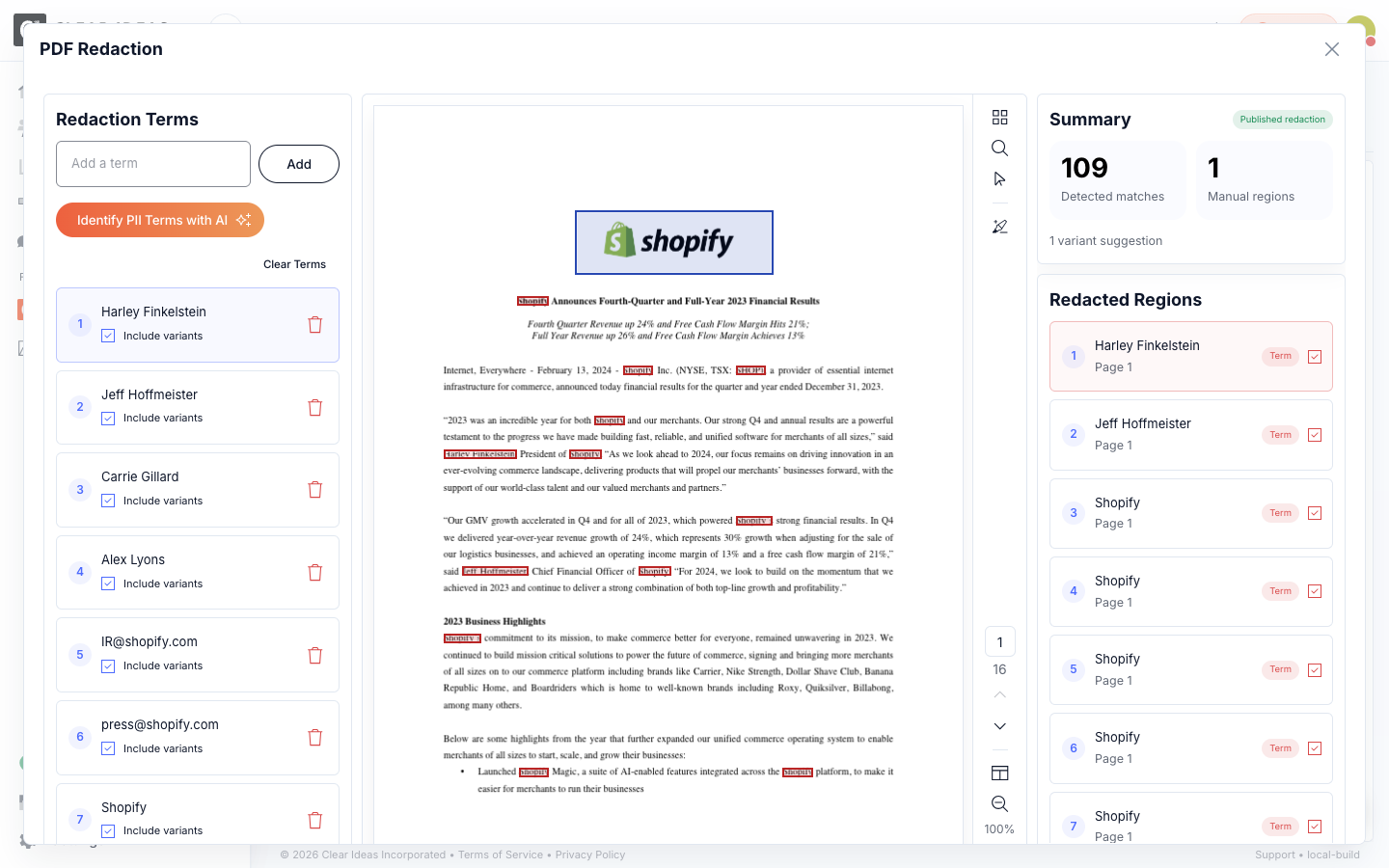
Identify PII Terms with AISuggested terms give administrators a faster starting point before review.
Manual RegionsDraw regions for signatures, stamps, photos, charts, or other visual content.
Document protection path
One File, Role-Aware Representations
Watermarking and redaction work inside the Site boundary, so reviewers receive the protected document experience their role allows.
Watermarked View
Viewer name, email, date, and time make each delivered PDF traceable.Redaction Review
AI-suggested terms, exact or variant matching, manual regions, and drafts.Restricted Delivery
Restricted roles receive the redacted representation in viewers and downloads.AI and Search
Search, extracted text, summaries, and AI Chat stay aligned to role access.Protected Site recordViewing, downloads, search, summaries, AI, and audit activity resolve through the same document controls
Capabilities
Traceable Viewing, Reviewable Redaction, and Role-Aware Delivery
These controls are strongest because they are integrated. Administrators do not need to export a PDF, redact it elsewhere, re-upload a second file, and hope the right version reaches the right people. The protected representation stays connected to the source record and resolves through the Site.
- Viewer-Specific WatermarkingAdd viewer name, email, date, and time to protected PDFs so copies shown or downloaded by external reviewers remain attributable to the session.
- AI-Assisted Redaction ReviewStart with AI-suggested PII terms from extracted document text, then let administrators review, remove, add, and refine terms before anything is finalized.
- Term and Region ControlsRedact repeated terms with exact or include-variants matching, then draw manual regions for signatures, stamps, photos, charts, or other visual content.
- Textual and OCR PDFsRedact native-text, scanned, and image-based PDFs. OCR improves automatic term selection, while manual regions support any PDF page.
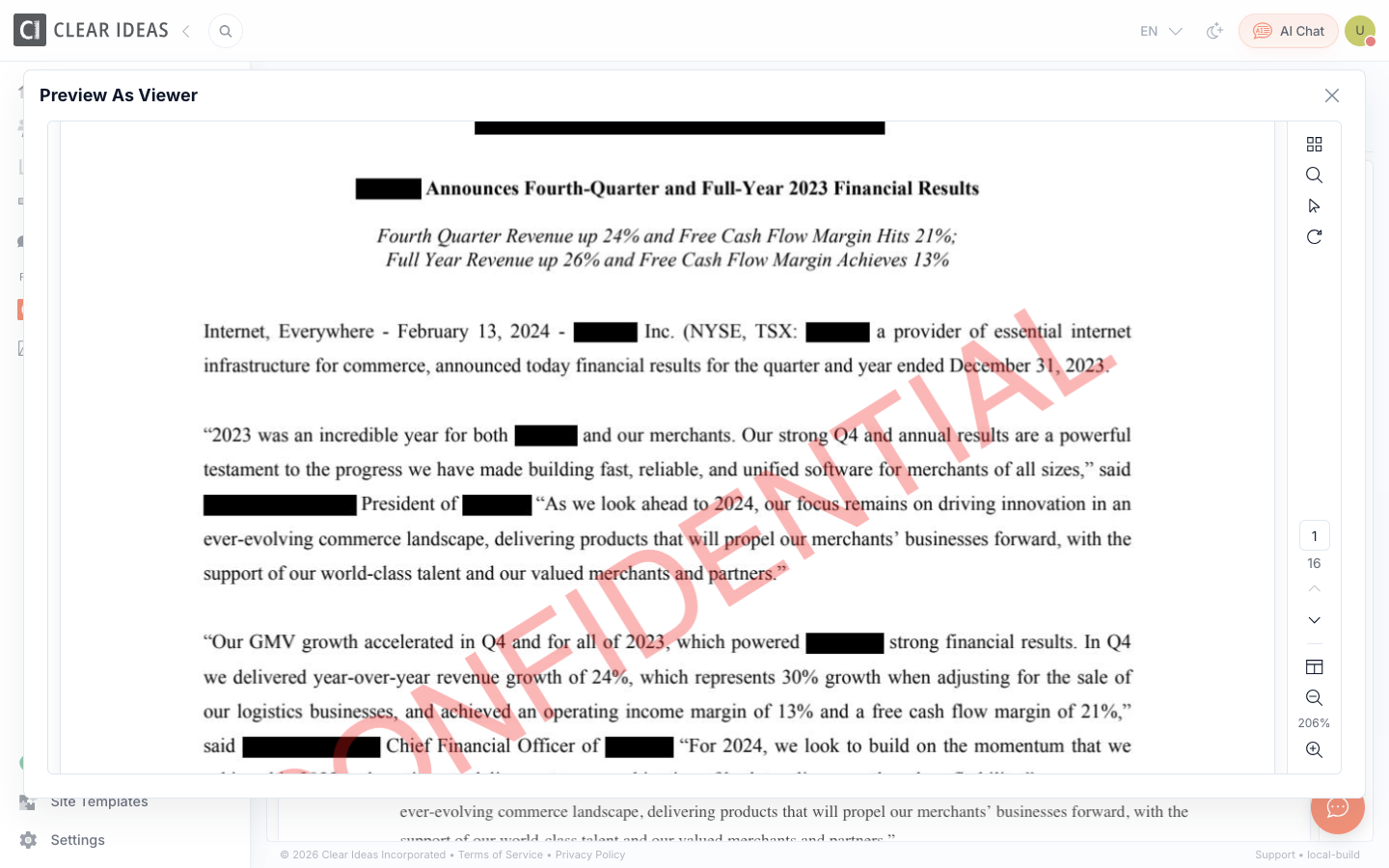
- Preview as RolePreview the document as a restricted role before broader disclosure, including the redacted representation, watermark behavior, and print controls.
- Permission-Aware DeliveryResolve redacted and unredacted representations by role across file views, downloads, extracted text, summaries, search results, and AI Chat.
- Governed Original AccessPreserve governed access to the original PDF for authorized roles where policy allows, while restricted users receive only the finalized protected representation.
Choose the Right Protection for Each Document
Watermarking and redaction solve different disclosure problems. Clear Ideas lets administrators combine them with roles, downloads, search, AI, and audit records instead of treating protection as a detached PDF chore.
Deter Sharing
Use watermarks when reviewers can see the document, but every viewed or downloaded copy should remain traceable.
Remove Sensitive Content
Use destructive PDF redaction when names, identifiers, signatures, or visual regions should not be disclosed to a restricted role.
Keep AI Aligned
Keep search, summaries, extracted text, and AI answers aligned with the document representation each role is allowed to receive.
Validate disclosure
Preview the Protected Version Before Reviewers Receive It
Preview as role gives administrators a concrete check before disclosure. They can confirm how a viewer receives the PDF, including finalized redactions, viewer-specific watermark behavior, print controls, and the representation downstream access will use.
Site policy
Configure PDF Protection Once, Then Apply It Across Review
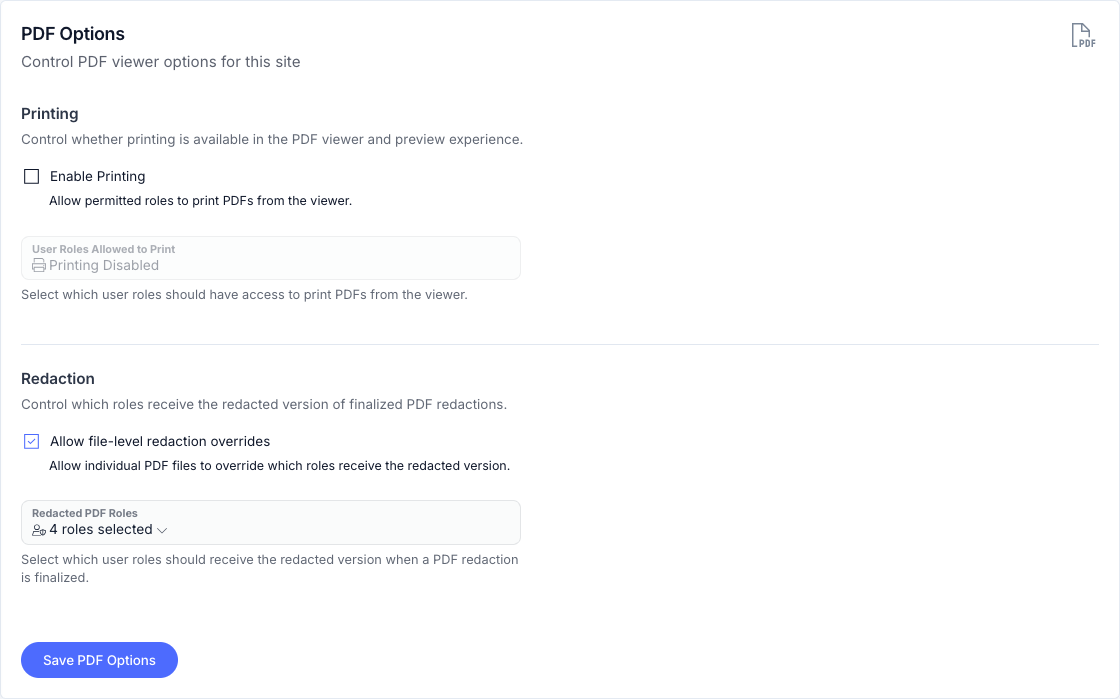
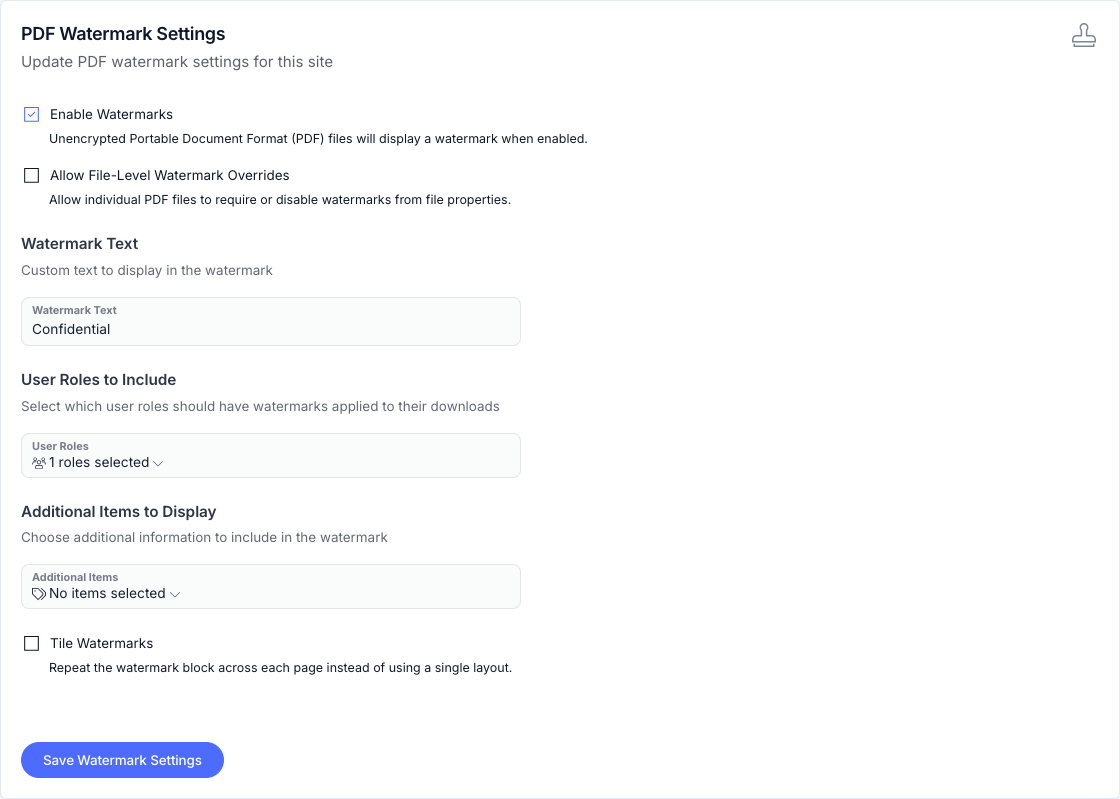
Site settings define the default boundary for PDF printing, redacted-role delivery, viewer watermarks, watermark content, and file-level overrides. Administrators can still tune individual files when a document needs a narrower rule, while users keep a seamless review experience: the Site resolves the version their role should receive.
Use cases
Useful Wherever PDF Disclosure Needs Boundaries
Teams use redaction and watermarking when the same document needs to support useful review, traceable access, permission-aware AI, and different audience boundaries without turning one source file into a confusing set of unmanaged copies.
- Due Diligence and Data RoomsPrepare contracts, schedules, HR files, financial materials, and legal documents for external review without exposing every underlying detail to every audience.
- Board and Committee MaterialsTrace board pack access with viewer-specific watermarks and redact observer-sensitive content before materials leave the internal team.
- Audit and Regulator RequestsRespond with narrower disclosure packages that preserve the original record while giving outside reviewers the protected version they are meant to inspect.
- Client and Advisor PortalsGive clients and advisors useful access to source documents while preserving attribution, controlled downloads, and role-aware AI behavior.
Related reading
Learn More About Controlled Disclosure
Practical guides for teams sharing sensitive PDFs with external stakeholders.
- PDF Redaction for Controlled DisclosureHow AI-assisted redaction, OCR-aware matching, and role-aware delivery work together.
- Document Watermarking in VDRsHow viewer-specific watermarks support deterrence, traceability, and controlled review.
- Secure Document Sharing Checklist for External StakeholdersA practical checklist for permissions, review, watermarks, and disclosure control.
Redaction and Watermarking Questions
When should I use watermarking instead of redaction?
Use watermarking when a reviewer is allowed to see the document but each viewed or downloaded copy should remain attributable. Use redaction when a reviewer should receive a representation with specific sensitive content removed.
Does PDF redaction apply to AI and search?
Yes. When a PDF has a finalized redacted representation, restricted users retrieve from the redacted representation rather than the original. That keeps extracted text, summaries, search results, and AI Chat aligned with the version they are allowed to use.
Can Clear Ideas help find PII before redaction?
Administrators can ask Clear Ideas to suggest PII terms from extracted document text. The suggestions become an editable term list for human review before redaction is finalized.
Can I redact scanned PDFs?
Yes. Native-text, scanned, and image-based PDFs can be redacted. OCR improves automatic selection of matching terms, but administrators can always draw redaction regions on PDF pages.
Is redaction just a visual overlay?
No. Finalized redaction is not a black box drawn over the original. Clear Ideas images the PDF pages and produces a protected representation with the selected content removed, then delivers that representation to restricted roles across the file viewer, downloads, extracted text, search, summaries, and AI Chat.
Can administrators keep access to the original PDF?
Yes. Authorized roles can retain governed access to the original when policy allows, while restricted roles receive the finalized protected representation.
Protect the Document Without Breaking the Review
Clear Ideas keeps disclosure control close to the source file, the reviewer role, and the AI context. Administrators get practical protection controls, and users get the right document experience without a separate handoff.
Start Free
Book a DemoNo credit card required
Need help?
Get personalized assistance
Speak with our sales team to find the perfect plan for your organization.
Technical support & resources
Access support resources, documentation, and help guides.