Sites
Q&A and Notes for Site Reviews
Private questions, document-linked answers, notes, and announcements
Clear Ideas Sites turn review communication into part of the governed workspace. Stakeholders ask from the document context, administrators answer from approved material, and notes, announcements, AI suggestions, anchors, and status changes stay with the Site record.
Review communications
Keep Questions Attached to the Material Under Review
External reviews often create a second workspace in email: questions arrive without context, internal drafts move between reviewers, and final answers drift away from the file that caused them. That slows the review and weakens the record.
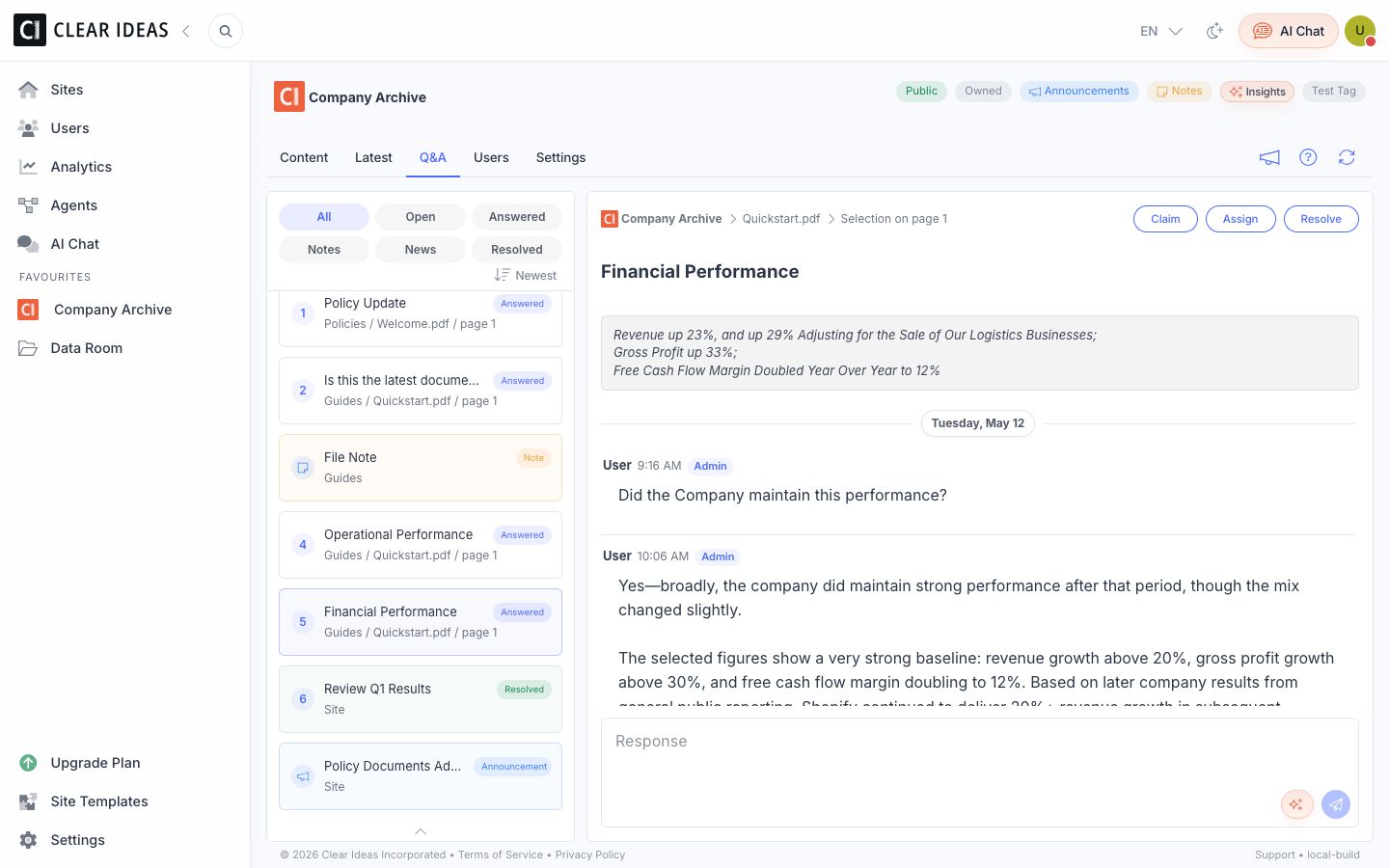
Clear Ideas keeps the conversation inside the Site. Stakeholders ask from the file, page, or passage they are reviewing. Administrators manage the queue, use AI suggestions where helpful, publish notes or announcements when one answer should reach many people, and preserve the exchange alongside permissions, activity, analytics, exports, and governance evidence.
Q&A capabilities
Private Threads, PDF Anchors, Reviewer Workflow, and Public Updates
Site Q&A is built for controlled review rather than open forum discussion. It gives users a natural way to ask while they review, and gives administrators a managed way to answer without leaving the document system of record.
- Private Reviewer ThreadsLet each stakeholder ask questions without exposing their thread to every other reviewer. Administrators manage the queue from the same Site that holds the documents.
- Document-Linked ContextTie questions to a Site, file, PDF page, selected PDF text, or highlighted region so the answer stays connected to the material that prompted it.
- Administrator Review WorkflowRoute Q&A to admins or editors, draft responses, answer, edit, resolve, archive, and preserve the exchange as part of the governed Site record.
- AI Answer SuggestionsUse suggestions grounded in approved Site content to help administrators draft answers while keeping the final response under human control.
- Notes and AnnouncementsPublish file notes and Site announcements when one administrator clarification should be visible to the relevant review audience.
- Policy-Aware ControlsControl Q&A, notes, announcements, PDF anchors, AI suggestions, and reviewer roles through Site settings and organization policy.
- Review RecordKeep questions, answers, notes, announcements, anchors, status changes, and timestamps in the governed workspace instead of losing them in email.
From Question to Governed Record
Q&A keeps review communication close to the document, visible to the right reviewers, and preserved with the Site record.
Where it fits
Useful Anywhere Reviewers Need Answers in Context
Q&A and notes are strongest when the document context matters as much as the answer, and where a later reviewer may need to understand who asked, what was answered, and which material the answer referred to.
- Due Diligence ReviewsHandle buyer, investor, lender, or advisor questions without turning the data room into scattered email threads and side spreadsheets.
- Audit and Compliance RequestsKeep auditor questions close to the document evidence and preserve responses for later review, export, and follow-up.
- Board and Committee PortalsCollect director questions, publish clarifications, and add notes to packet materials without losing the context behind the answer.
- Client PortalsLet clients ask about specific deliverables, statements, pages, or passages while your team manages answers centrally.
Related reading
Plan Review Workflows Around the Site Record
Guides for diligence rooms, client portals, and stakeholder review workflows.
- Virtual Data Room Checklist for Due DiligenceHow to prepare structure, permissions, numbering, Q&A, and review workflows for diligence.
- Client Portal Setup Checklist for Professional ServicesHow to set up client portals for document delivery, questions, signing, and engagement tracking.
- Tracking User Journeys in Your Data RoomHow activity signals and review questions help teams understand stakeholder intent.
Frequently Asked Questions
Who can see Q&A threads?
Q&A is designed for private stakeholder questions. Users see their own threads, while authorized reviewers manage the Site review queue according to Site settings and organization policy.
Can questions refer to a specific PDF passage?
Yes. Questions can be anchored to a file, PDF page, selected PDF text, or highlighted PDF region when PDF anchors are enabled. That keeps the answer tied to the exact material under review.
Do reviewers stay in control of answers?
Always. Clear Ideas can provide AI answer suggestions grounded in approved Site content, but authorized reviewers decide what to send. The goal is faster, better-supported drafting while keeping sensitive responses under reviewer control.
What is the difference between a note and an announcement?
Notes add context to content or a specific file. Announcements are broader Site-level updates for the review audience, such as a clarification, deadline, or newly available material.
Can Q&A be controlled by policy?
Yes. Organization policy and Site settings can control whether Q&A, AI suggestions, notes, announcements, and PDF anchors are available.
Why keep Q&A inside the Site instead of email?
Review questions are part of the sensitive collaboration record. Keeping them inside the Site preserves context, permissions, timestamps, reviewer actions, notes, announcements, and the link back to the documents being reviewed.